Affordable LightBurn Alternatives for GRBL Lasers
Published: April 7, 2026 · Updated: August 29, 2026
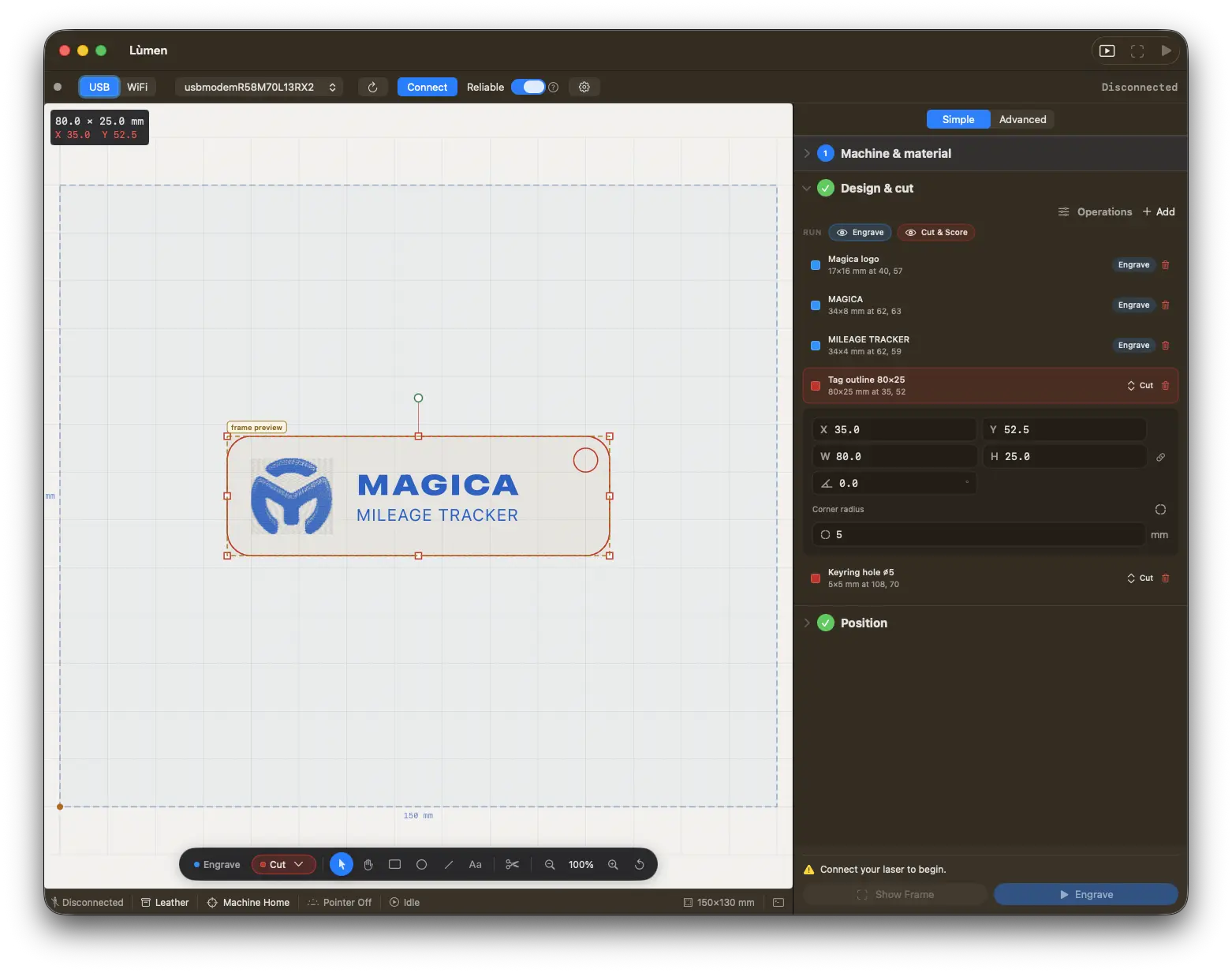
Lùmen — the LightBurn alternative for Mac
Native macOS controller for GRBL diode lasers: image engraving with 7 dithering algorithms, SVG cutting, dual-layer workflow, and presets for Sculpfun, Ortur, Atomstack, TwoTrees, NEJE. €19.99 one-time, no subscription. 3-day free trial.
Why People Look for LightBurn Alternatives
LightBurn has been the gold standard for laser engraver software for years, and for good reason. But its higher price and move to paid annual update renewals have pushed many hobbyists to explore alternatives.
Under the current pricing, the Core license (for GRBL and Marlin machines) is a one-time $99, with a higher-priced Pro tier for DSP controllers (Ruida or Trocen, CO2 lasers). It is still a perpetual license — the software keeps working forever — but it now includes only a year of updates; staying on the latest version afterward requires a paid renewal. That switch from lifetime updates to annual renewals was met with significant pushback from the community.
For hobbyists who own a single GRBL-based diode laser and use it on weekends, paying $99 up front — and again to keep updates coming each year — can feel excessive. Many of these users only need the basics: importing an image, choosing a dithering algorithm, and sending GCode to their machine. They might do some simple SVG cutting on the side. Paying for advanced features they never touch is hard to justify.
That said, LightBurn is still a very capable program for professional and advanced users. Before looking at alternatives, it is worth understanding what makes it so popular.
What Makes LightBurn Great
Let's be fair: LightBurn earned its reputation. It is a genuinely excellent piece of software.
- Broad controller support — LightBurn works with GRBL, Ruida, Trocen, Marlin, and other controllers, so it drives CO2 lasers with a Ruida panel as well as diode lasers.
- Camera alignment — Built-in support for USB cameras lets you align your workpiece visually and position designs with precision.
- Rotary support — Need to engrave a tumbler or a cylindrical object? LightBurn handles rotary axis configuration out of the box.
- Advanced vector editing — You can design directly inside LightBurn with node editing, Boolean operations, and offset tools. It is not a full replacement for Illustrator or Inkscape, but it covers a lot of ground.
- Cross-platform — Available on macOS, Windows, and Linux.
- Documentation and community — LightBurn has excellent official documentation, active forums, and a large user base that shares tips and settings.
That breadth is what the price and the update renewals pay for, and it matters most to people who use the software professionally or depend on its full feature set.
Free Alternatives
Several free options exist, though each comes with trade-offs. Here is an honest look at the most common ones.
LaserGRBL (Windows only)
LaserGRBL is the most popular free laser engraving software. It is open-source, well-maintained, and has a solid community behind it.
The main limitations: it only runs on Windows (no Mac, no Linux), it has no SVG cutting support, and the user interface feels dated. It also lacks advanced features like layer management or project files. If you are on a Mac and looking for a LaserGRBL replacement specifically, see our dedicated LaserGRBL alternatives for Mac guide.
LaserWeb (Cross-platform)
LaserWeb is a browser-based, open-source tool that runs on any platform. It supports both raster engraving and vector cutting, and works with GRBL, Marlin, and Smoothieware controllers.
The downsides are significant: the setup process involves running a local server, the project is not actively maintained, and the interface can be overwhelming for beginners. If you are technically inclined and willing to invest time in configuration, LaserWeb is capable. But it is not something most hobbyists would describe as user-friendly.
Universal Gcode Sender (Cross-platform)
UGS (Universal Gcode Sender) is a Java-based CNC controller that works on Mac, Windows, and Linux. It can send GCode to any GRBL machine, including laser engravers.
However, UGS is a CNC sender, not a laser-specific tool. It has no built-in image processing, no dithering algorithms, and no raster engraving pipeline. You would need to generate your GCode in another application and then use UGS purely as a sender. For laser users, it works in a pinch but is not a complete solution.
K40 Whisperer (K40 CO2 lasers only)
K40 Whisperer is a free tool designed specifically for the cheap K40 CO2 laser cutters that use a Lhystudios (M2 Nano) controller board, and it does not work with other machines. Lùmen does not drive these boards either: it is built for GRBL diode lasers.
Paid Alternatives
Lùmen (macOS, one-time €19.99)
Lùmen is a native macOS application built specifically for GRBL-based diode lasers. It takes a focused approach: instead of trying to support every controller and every platform, it does one thing well — controlling GRBL lasers from a Mac.
Key features include:
- 7 dithering algorithms — Floyd-Steinberg, Atkinson, Burkes, Jarvis-Judice-Ninke, Sierra, Sierra Lite, and Stucki. Atkinson is particularly popular for laser engraving due to its high-contrast output.
- SVG cutting — Import SVG files for vector cutting with adjustable power, speed, and number of passes.
- Built-in editor — Draw rectangles, ellipses, multi-line text in any font installed on your Mac, and paths with a pen that draws curves, straight on the canvas, and set size and rotation numerically in millimetres. Edit a path point by point, combine shapes (union, subtract, intersect, exclude), add an outline at a set distance, or break a drawing into its separate parts. Select several objects to move, align or space them, copy and paste between projects, add QR codes and barcodes that Lùmen checks will scan, and lock objects or keep them as references that never burn — like a numbered bed grid burnt once on a sheet. Simple jobs never need Inkscape or Illustrator.
- Object list with operations — Every shape, text, image, code and SVG in the order the machine runs them, each with its operation (engrave, score, cut) on a pill you can change: a drawn shape moves from engrave to cut and back without losing its fill.
- Design with Claude — A local MCP server lets Claude Desktop or Claude Code build a design in plain language: shapes, text, imported images, alignment, material presets. It is design-only — the AI never moves the head, homes, or fires the laser.
- USB or WiFi — The same GRBL command stream over a cable or over the network (GRBL-over-TCP) for ESP32/ESP3D-class controllers.
- Simple and Advanced sidebars — A five-step guided flow for a first job, or a full cockpit when you know what you want. Same engine, switch any time.
- Reliable streaming and resume — For long jobs that stall on flaky USB links, Reliable mode sends one line at a time and recovers a dropped acknowledgement; after a stop you can resume from the exact G-code line.
- Air assist — If your controller switches an air pump, Lùmen switches it with the job: on before the first move, off at the end, in streamed and exported jobs alike.
- Device presets — Built-in profiles for popular machines from Sculpfun, Ortur, Atomstack, TwoTrees, and NEJE. Custom presets can be saved as well.
- 18 material presets — Pre-configured power and speed settings for wood, leather, paper, acrylic, and more, plus a power/speed test grid generator to dial in your own.
- Editable project files — The native
.gcodev2 format embeds every shape, text, and style as JSON, so a reopened project is still editable item by item — nothing is flattened, and generic G-code senders still read the file. - Native SwiftUI interface — Feels like a proper Mac app, not a cross-platform port.
The price is €19.99 one-time, with free updates for life — no subscription, no renewal fees. That is a fraction of what a LightBurn license costs up front.
The trade-offs are clear: Lùmen only works on macOS, and it only supports GRBL controllers. There is no camera alignment and no tracing of a bitmap into vectors, and air assist runs per job rather than per layer. If those limitations match your setup — a Mac and a GRBL diode laser — it is an excellent value.
Download Lùmen and try it with your machine.
Vextrify (€149.99/year, or €249 one-time)
Vextrify is the newest name on this list: a production suite launched in 2026 that runs in the browser and as a native desktop app for macOS and Windows. It is also the most ambitious of the alternatives here. It drives GRBL diode lasers and CO2 machines with Ruida controllers — several at once from one computer — with camera alignment (lens calibration from ArUco markers), colour-coded layers in the LightBurn style, a rotary mode for cylindrical parts, material recipes, and preparation studios for photos, 3D relief, vectorising and QR codes that hand their result straight into the laser job. It also exports clean files for LightBurn, EZCAD or Ruida when a job belongs elsewhere.
Two things are worth knowing before comparing prices. The entry plan — Studio, €99.99 a year — is the online suite only and does not control a machine: driving a laser starts at Studio Pro, €149.99 a year, or Lifetime Pro at €249 once, which includes twelve months of the online studio and its AI credits. And the product is account-based: you sign up and work in a workspace, with the desktop app included in the paid tiers.
It is a serious piece of software, built to cover preparation and production across diode and CO2 machines, and it is priced like one. If what you need is to put a photo on a piece of wood with the GRBL laser on your desk, it is a lot of suite for that job.
Lùmen vs Vextrify at a glance:
| Lùmen | Vextrify | |
|---|---|---|
| Cost to control a laser | €19.99 once | €149.99/year, or €249 once |
| Shape | A Mac app you install | Browser suite + desktop app |
| Account required | No | Yes |
| Machines | GRBL diode | GRBL diode + CO2/Ruida, several at once |
| Connection | USB or WiFi | USB |
| Camera alignment | No | Yes |
| Rotary | Yes | Yes |
| Design tools | Shapes, text, pen, Boolean, offset, QR | Vectorise, 3D relief, AI images, QR |
| Updates | Free for life | While subscribed (12 months with Lifetime Pro) |
Comparison Table: LightBurn vs LaserGRBL vs Lùmen
| Feature | LightBurn | LaserGRBL | Lùmen |
|---|---|---|---|
| Price | $99 one-time (Core) | Free | €19.99 once |
| Platform | Mac, Windows, Linux | Windows | macOS |
| Controller Support | GRBL, Ruida, Trocen, Marlin | GRBL | GRBL |
| Image Engraving | Yes | Yes | Yes |
| Dithering Algorithms | Several | Several | 7 |
| SVG Cutting | Yes | No | Yes |
| Camera Alignment | Yes | No | No |
| Rotary Support | Yes | No | Yes (since 3.0) |
| Air Assist | Yes, per layer | Via custom G-code | Yes, per job |
| Built-in Design Tools | Yes (nodes, Boolean, offset) | No | Yes (nodes, Boolean, offset) |
| Layer System | Yes (multi-layer) | No | Yes (engrave + cut/score operations) |
| Project Files | Yes | No | Yes |
| Native Mac App | No (cross-platform) | No | Yes (SwiftUI) |
When Lùmen Is Not the Right Fit
Lùmen is built for one setup: a GRBL diode laser driven from a Mac. It is not the right tool if any of the following apply to you:
- You have a CO2 laser with a Ruida or Trocen controller. Lùmen drives GRBL controllers only, so it cannot run DSP controllers.
- You need camera alignment. Lùmen has no camera support: you position a design with the frame and the laser pointer instead.
- You need air assist switched layer by layer. Lùmen gives every cut and score operation its own speed, power and passes, and every image its own settings, but it switches air assist for the whole job.
- You work on Windows or Linux. Lùmen runs only on macOS.
- You need to trace images into vectors. Lùmen edits points, combines shapes and draws outlines at a distance, but it does not trace a bitmap: a logo you only have as a picture is vectorised in a design app and imported as SVG.
If none of these apply — a Mac and a GRBL diode laser — the free 3-day trial is the quickest way to find out whether Lùmen covers your work.
When an Alternative Makes More Sense
On the other hand, Lùmen is worth a look if:
- You have a GRBL-based diode laser. Machines from Sculpfun, Ortur, Atomstack, TwoTrees, NEJE, and similar brands all use GRBL. You do not need DSP support.
- You mostly do image engraving and simple cutting. If your typical workflow is importing a photo, applying a dithering algorithm, and sending it to the laser, you do not need LightBurn's full feature set.
- You are on a Mac and want a native experience. Cross-platform apps often feel foreign on macOS. A native SwiftUI app integrates with the system in ways that ported software cannot.
- Budget is a concern. A one-time payment of €19.99, with free updates for life, costs far less than LightBurn's $99+ up front plus paid renewals to stay current. You pay once and you are done.
- You are just getting started. If you bought your first diode laser and want to try engraving without committing to LightBurn's price, Lùmen's free 3-day trial lets you learn the basics on your own machine before you spend anything.
The Bottom Line
LightBurn is a broad, feature-rich program, and its price reflects that. But not everyone needs everything LightBurn offers.
If you are a Mac user with a GRBL diode laser, Lùmen gives you image engraving with 7 dithering algorithms, SVG cutting, a dual layer system, and device presets for a one-time €19.99. No subscription, no recurring fees, and a free 3-day trial to check it with your own machine first.
If you are on Windows or Linux, or run a CO2 laser with a DSP controller, Lùmen is not the right tool: it is built for GRBL diode lasers on a Mac.
Pick the tool that matches your machine, your platform, and your budget. The best software is the one you will actually use.