A laser’s motors move a set number of steps for every millimetre, and the controller stores that number: $100 for X, $101 for Y. If it doesn’t quite match the belts and pulleys actually fitted, every job comes out slightly too small or too large: a 100 mm line measures 99.6 mm. Lùmen burns two pairs of marks a known distance apart, you measure them, and Lùmen corrects the number in the controller. The correction stays in the machine.
Before you calibrate
Burn a square of known size, 100 mm for instance, and measure it. If it measures right, there is nothing to calibrate. If it is off by the same amount every time, calibrating fixes it. If it changes from one job to the next, or the corners don’t meet, the cause is mechanical, a loose belt or a slipping pulley: fix that first. A calibration corrects a steady error, not play.
1Open the assistant
With the machine connected and idle, choose Machine ▸ Calibrate Axes…, or press Calibrate Axes… in Machine & material (in Advanced, the Machine section). If something stands in the way, the window says what: the virtual laser has nothing to calibrate, and with the rotary on, go back to the flat bed first.
2Burn the marks
Put an offcut under the head, focus, and move the head to the offcut’s front-left corner: the marks go to the right of the head and away from it. In Marks apart, Lùmen proposes the longest distance that fits from there, up to 400 mm: the further apart the marks, the more precise the measurement. Power and Speed start from the score values; the marks only need to be thin and clearly visible.
Press Burn the Marks. Lùmen burns two marks along the front and two along the left side, then brings the head back to where it started. Your project is left as it was.
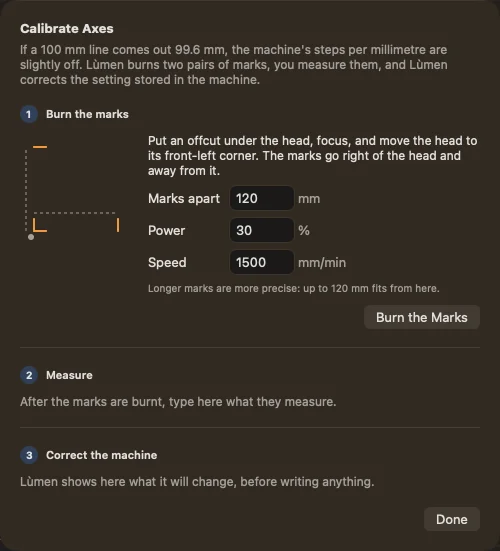
3Measure
Measure each pair between the same edges: left edge to left edge for the marks along the front, front edge to front edge for the ones on the side. That way the width of the beam cancels out. Type the two numbers in Left to right and Front to back; next to each one, the window shows which machine setting it corrects. Leave one empty to correct only the other axis.
Use a caliper if you have one. A ruler can be half a millimetre out, which on 120 mm is 0.4%, as much as most corrections. With only a ruler, use the longest marks that fit.
4Correct the machine
Before writing anything, Lùmen shows for each axis the value in the machine, the new one, and the change as a percentage. Under a tenth of a percent it says Already right and leaves that axis alone. Over 2% it won’t write: a belt doesn’t stretch that much, so either the measurement is wrong or the machine’s setting doesn’t suit its motors (microstepping or pulley), and a correction can’t fix that.
Press Write to the Machine. When the controller has the new values, the window says Written and read back from the machine. If you had set a zero, set it again: it was measured with the old values. Then burn the square from the start again: it should now measure what you drew.
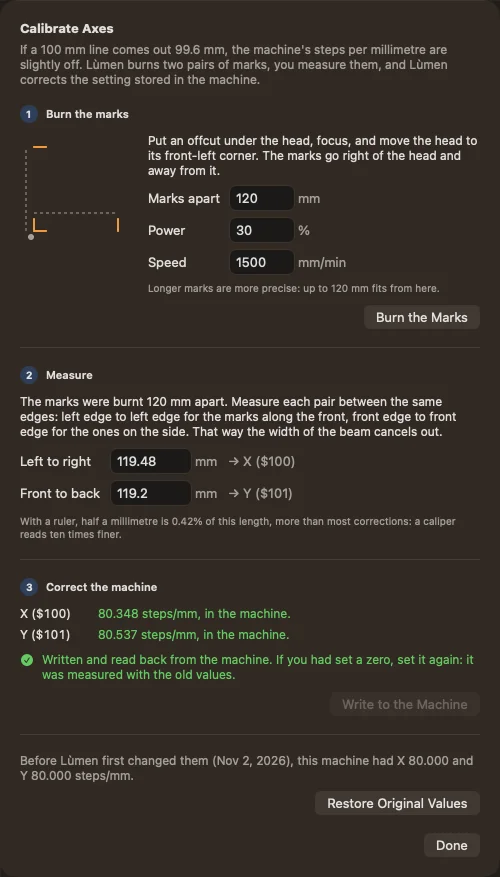
Going back
The first time Lùmen changes a machine’s steps per millimetre, it keeps the values the machine had before. The window shows them, with Restore Original Values to put them back. Later calibrations don’t replace them: Restore always goes back to the machine as it was before Lùmen first changed it.
Soft limits. If the machine has soft limits on and the correction raises the steps, the head now covers the full travel set in the machine, a fraction of a millimetre more at the far ends. If it has ever stopped close to the frame, jog slowly to that end once.
With a rotary. Calibrate with the rotary switched off. Lùmen remembers the new Y value and puts it back when you return to the flat bed.