In Lùmen a code is an object of the project, not an imported image: its modules and bars are redrawn from the content. You can change the text, the type and the size at any time. Whether it really scans depends on the material, the engraved size and the resolution.
1Add a code
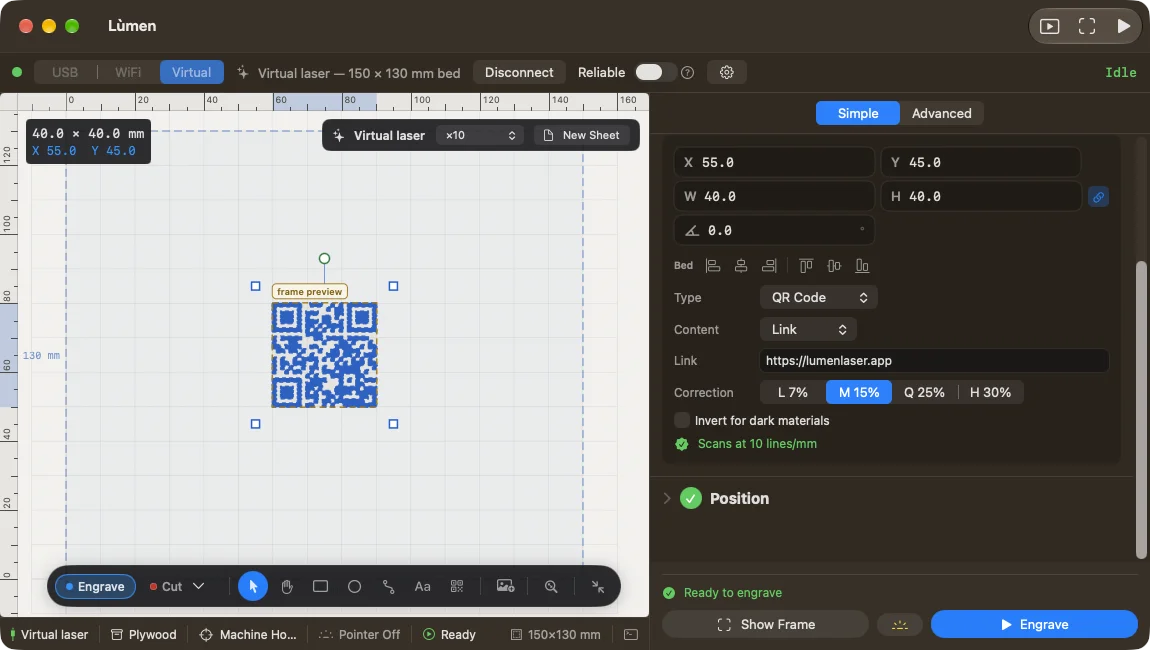
Press the QR button in the toolbar on the canvas, or choose Add ▸ QR code / barcode at the top of the list of objects. Select the new object: its fields appear in the panel.
In Type choose the format. Two-dimensional: QR Code, Data Matrix, Aztec and PDF417. Linear, under Barcodes: Code 128, Code 39, EAN-13 and UPC-A. Choose the one the final reader can read: a QR with a link opens with a phone’s camera; EAN-13 and UPC-A are the numeric codes of products on sale.
2Write the content
In the formats that take text, choose what to encode in Content: Text, Link, Wi-Fi, Contact, Email, Phone or SMS. You fill in the fields and Lùmen writes the content in the right form. A link without a prefix becomes an https:// address. A Wi-Fi network needs its name, its security and, if it has one, its password; Hidden network is for a network that doesn’t announce itself.
Each format has its rules. Code 39 takes capitals, digits and a few symbols. EAN-13 and UPC-A take digits only: enter 12 or 11 and Lùmen adds the check digit, or enter the whole code. Code 128 doesn’t take accented letters. If the content won’t do, the panel says why, and the canvas keeps the last valid version until you fix it.
3Fit it to the material
- Correction (QR only): L, M, Q or H. The higher it is, the better the code reads when damaged, but the modules get denser.
- Invert for dark materials: engraves the light parts instead of the dark ones. Use it when the laser leaves a light mark on a dark surface, as on slate or anodised metal.
- Show text under the bars (linear codes only): the digits in plain text under the code.
The white margin around the code is part of the code: keep frames and other marks out of it. Resize the object like any other; two-dimensional codes stay square. A code is engraved or scored, never cut.
4Check that it scans
Under the fields, Lùmen tries to read the code as it would be engraved at the current resolution. In green, Scans at … lines/mm: the test passes. Otherwise the panel suggests making it wider or raising the resolution.
The real test is on the material. The check is about the drawing, not the mark your laser leaves. Before a run of pieces, engrave a sample on the real material and read it with the phone or scanner you’ll use in the end.