Lùmen’s settings are about the app on this Mac: language, notifications, privacy, license and AI control. The machine and the material live in the project’s panel instead. Open them from Lùmen ▸ Settings… (⌘,).
Language
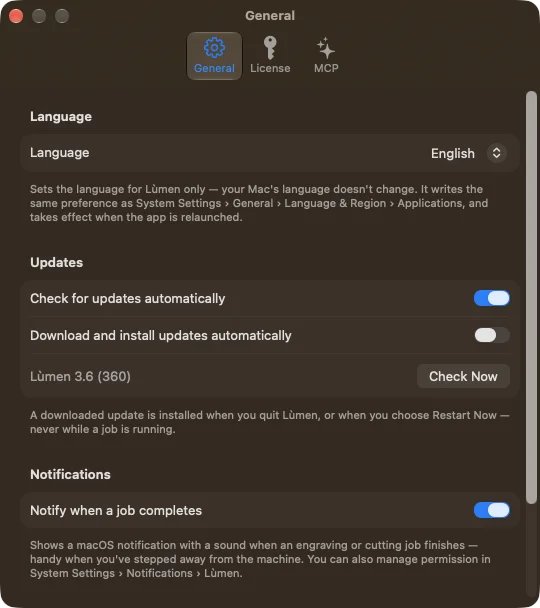
In the General tab, the Language menu follows the Mac’s language (System) or uses one just for Lùmen: English, Italian, Spanish or French. The Mac’s language doesn’t change. The new language applies from the next launch: Relaunch Now does it straight away. During a job Lùmen won’t relaunch: wait for it to end, or stop it; your choice is saved in the meantime.
It is the same setting as macOS’s System Settings ▸ General ▸ Language & Region ▸ Applications: change it in one place and it changes in the other.
Notifications and privacy
Notify when a job completes shows a notification with a sound at the end of each engraving or cut: handy when you step away from the machine. If it doesn’t arrive, check the permission in System Settings ▸ Notifications ▸ Lùmen. The notification says the job has ended; before taking the piece out, look at the machine anyway.
Share anonymous usage data stays off until you turn it on. If you do, Lùmen sends anonymous, aggregated events: which tools and materials you use and how jobs end. Never file names, designs or G-code. You can turn it off at any time.
The license
The License tab says whether Lùmen is on trial (and how many days are left), Active or Not Licensed. From there you can buy one with Buy License or, if you already have one, paste the key into the License Key field and activate it. If activation fails, the reason is written under the field.
With an active license, the tab shows the key partly hidden and the Orders & Receipts link, where you find receipts, invoices and the key by signing in with the email you bought with. Deactivate License, after you confirm, removes it from this Mac: you can activate it again later with the same key, on a new Mac for example. If you lost the key, Lost your license key? takes you to your order history.
AI control needs the license: it isn’t there during the trial.